


 By
By Apple’s latest iPhone software update, iOS 17, introduces a wide range of improvements designed to make iPhones more personal, smarter, and easier to use. With new communication tools, interactive widgets, enhanced privacy, and smarter system features, the update significantly improves the overall iPhone experience. iOS 17 focuses on personalization, productivity, and connectivity, making everyday tasks smoother and more enjoyable for users.
Below are the key features and improvements included in the latest iPhone update.
1. Contact Posters for Personalized Calls
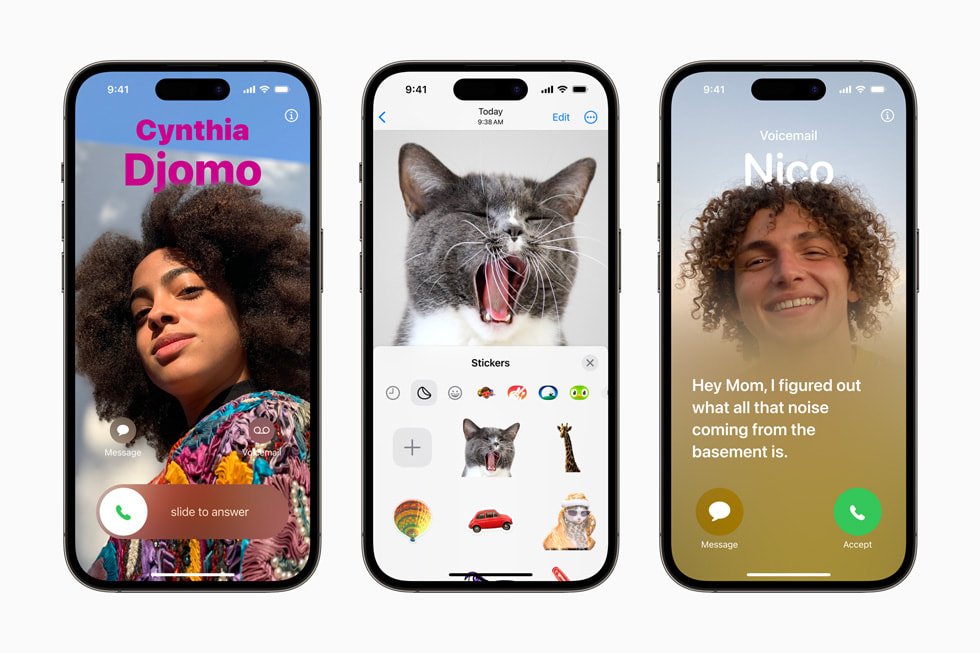
One of the most exciting additions in iOS 17 is Contact Posters, which allow users to customize how they appear when calling someone.
With Contact Posters, users can create a personalized profile with photos, fonts, colors, and emojis. When you call another iPhone user, your customized poster appears on their screen, making calls more visually appealing and personal.
This feature also integrates with the Contacts app, ensuring that your customized identity appears consistently across Apple devices.
2. StandBy Mode – Turning iPhone into a Smart Display
iOS 17 introduces StandBy Mode, a new feature that transforms your iPhone into a smart display when it is charging and placed horizontally.
StandBy mode shows useful information such as:
- Clock and calendar
- Weather updates
- Photos
- Widgets
- Live activities like timers or sports scores
This feature is especially useful on a bedside table or desk, allowing users to quickly glance at information without unlocking the phone.
3. Interactive Widgets on the Home Screen
Widgets become far more useful in iOS 17 thanks to interactive widgets.
Previously, widgets were mainly used for viewing information. Now, users can interact with them directly from the home screen. For example:
- Mark reminders as completed
- Play or pause music
- Control smart home devices
- Check tasks or notes
This improvement reduces the need to open apps and makes the iPhone faster and more efficient for everyday tasks.
4. NameDrop for Easy Contact Sharing
iOS 17 introduces NameDrop, a new and innovative way to share contact information.
By simply bringing two iPhones close together, users can instantly share their contact details, including phone numbers, email addresses, and contact posters.
NameDrop uses AirDrop technology but simplifies the process, making it easier and faster to exchange information during meetings, networking events, or social gatherings.
5. Improved Messages App
Apple has made several improvements to the Messages app in iOS 17.
New features include:
- A redesigned app drawer for easier access to apps
- Voice message transcription so users can read audio messages
- Improved search filters to find messages quickly
- Enhanced stickers that can be created from photos
These updates make messaging more organized and interactive.
6. Live Voicemail
Another useful feature introduced in iOS 17 is Live Voicemail.
When someone leaves a voicemail, the iPhone shows a real-time transcription of the message on the screen. This allows users to decide whether they want to answer the call while the voicemail is still being recorded.
This feature helps users manage calls more effectively and avoid missing important messages.
7. Smarter Keyboard and Autocorrect
The keyboard in iOS 17 has been improved with a more powerful AI-based autocorrect system.
The system now better understands the context of sentences, making corrections more accurate. It also provides predictive text suggestions to help users type faster.
Additionally, the keyboard now learns from the user’s writing style, improving over time.
8. Enhanced Privacy and Security
Privacy continues to be a major focus for Apple. iOS 17 introduces several security improvements to protect user data.
These improvements include:
- Enhanced tracking protection in Safari
- Better app permission management
- Improved passcode security features
These updates ensure that users maintain full control over their personal information.
Conclusion
The iOS 17 update represents a significant step forward for the iPhone ecosystem. With features like Contact Posters, StandBy Mode, NameDrop, and interactive widgets, Apple has focused on making the iPhone more personal, efficient, and user-friendly.
By combining improved communication tools, smarter system features, and stronger privacy protections, iOS 17 enhances both productivity and everyday convenience for iPhone users.
Overall, the update reflects Apple’s continued commitment to innovation and delivering a seamless user experience across its devices.