

 By
Introduction
Artificial Intelligence (AI) is changing the way people use computers. From writing documents and creating images to developing software and analysing large amounts of data, AI is becoming an important part of everyday computing.
In 2026, one of the biggest developments in the computer industry is the growth of AI-powered PCs. Leading technology companies such as Microsoft, Intel, AMD, NVIDIA and Qualcomm are investing in hardware designed to support intelligent computing experiences.
Unlike traditional computers, AI PCs are designed to handle certain artificial intelligence tasks directly on the device. This development could make computers faster, smarter and more useful for students, professionals, businesses and content creators.
Let’s explore how AI-powered computers work and why they are becoming an important technology trend.
1. What Is an AI-Powered PC?
An AI-powered PC is a computer equipped with hardware and software designed to run artificial intelligence applications efficiently.
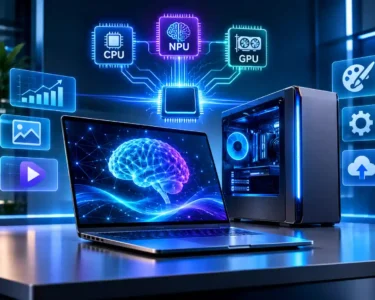
A key component in many modern AI PCs is the Neural Processing Unit (NPU). An NPU is a specialised processor that handles AI-related workloads, such as image processing, voice recognition and background effects.
Traditional computers mainly depend on the CPU and GPU for processing tasks. AI PCs can distribute certain workloads across the CPU, GPU and NPU, depending on the application.
This approach can improve efficiency and help computers perform AI tasks without relying entirely on cloud services.
2. How NPUs Are Changing Computer Performance
The NPU is one of the most interesting developments in modern computer hardware.
It is designed to perform specific AI calculations efficiently while reducing the workload on other processors.
For example, an AI-powered laptop can use its NPU for:
- Background noise cancellation during online meetings.
- Automatic camera framing and visual effects.
- Voice recognition and speech processing.
- AI-assisted image editing.
- Certain local AI assistants and productivity features.
This specialised processing can help improve battery efficiency when supported applications use the NPU effectively.
3. AI PCs and On-Device Artificial Intelligence
One major advantage of modern AI computers is the ability to run selected AI models locally.
Previously, many AI applications depended on cloud servers to process user requests. With capable local hardware, some tasks can now be performed directly on a laptop or desktop.
This offers several potential benefits:
Better privacy: Sensitive information can remain on the computer when the application processes it locally.
Reduced internet dependency: Certain AI features can work without a continuous internet connection.
Faster responses: Local processing can reduce delays caused by sending information to remote servers.
More control: Users can choose compatible local AI tools and models.
However, large AI models may still require powerful hardware or cloud computing resources.
4. How AI PCs Are Helping Students and Professionals
AI-powered computers are becoming useful across different industries.
Students can use AI tools to summarise study materials, organise notes, understand difficult concepts and improve productivity.
Software developers can use AI coding assistants to generate code suggestions, explain errors, write tests and understand unfamiliar programming concepts.
Graphic designers and content creators can use AI features for image editing, video production and creative workflows.
Businesses can benefit from intelligent document processing, data analysis, meeting assistance and automated workflows.
These capabilities can save time, although users should always review AI-generated information before relying on it.
5. The Importance of RAM, Storage and Graphics
A powerful processor alone does not make a computer suitable for every AI workload.
Memory, storage and graphics performance also matter.
RAM helps computers manage applications and larger workloads. SSD storage improves file access and application loading times, while GPUs provide the parallel processing power needed for demanding graphics and AI tasks.
In 2026, growing demand from AI infrastructure is also putting pressure on memory and other computer components. Industry reports indicate that supply constraints could influence hardware availability and prices.
As a result, customers should compare complete system specifications rather than purchasing a computer based only on its processor name.
6. What Should You Check Before Buying an AI PC?
If you are planning to purchase a new laptop or desktop, consider these important factors:
- Processor: Choose a modern CPU that matches your daily workload.
- NPU: Check its AI processing capabilities and supported applications.
- RAM: Consider 16GB as a practical starting point for general multitasking; heavier workloads may need 32GB or more.
- Storage: Prefer a fast SSD with enough capacity for your files and applications.
- Graphics: Consider a dedicated GPU if you plan to perform advanced video editing, 3D rendering or local AI development.
- Battery life: For laptops, compare real-world battery performance.
- Software compatibility: Check whether your preferred AI applications support the hardware.
Your requirements should determine your purchase rather than marketing labels alone.
7. The Future of Computer Technology
AI-powered PCs represent an important change in the computer industry. Future computers may become more capable of understanding user requests, automating repetitive work and assisting with complex tasks.
The development of better processors, faster memory, efficient NPUs and advanced graphics technology will play an important role in this transformation.
However, challenges such as hardware costs, privacy, security and software compatibility will continue to influence adoption.